

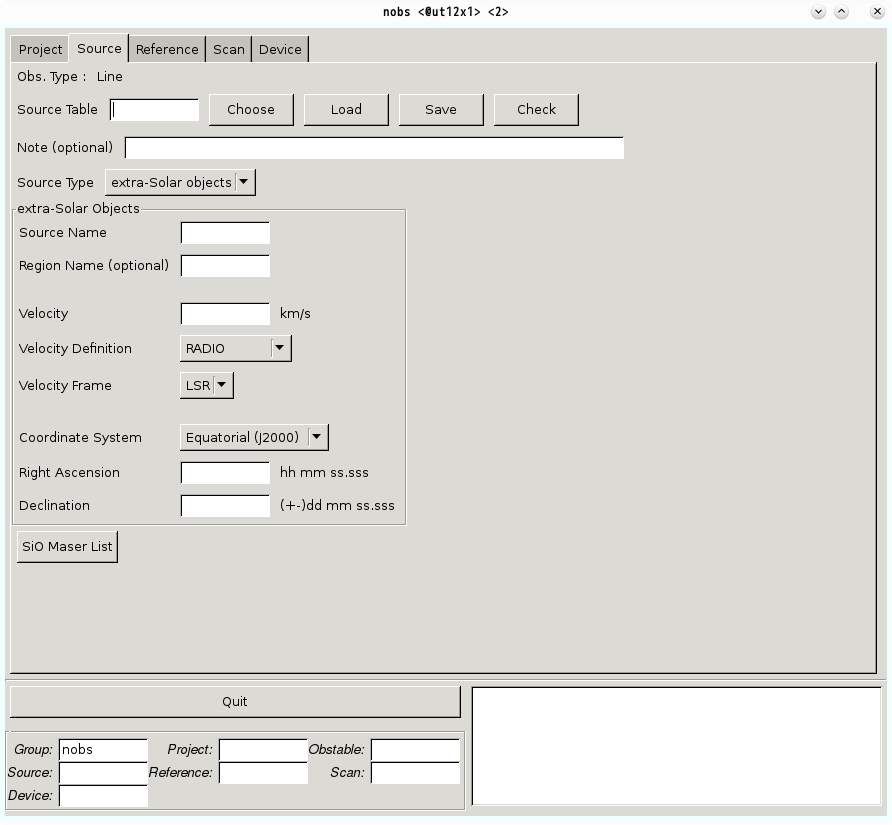
Source Table [mandatory field]
This field defines a name for the source table. It may be useful to match the name of the source table with that of your target source. The file will be saved in your working directory, which is as same as ‘Project’ you entered at the Project tab. For example, your account ID, project name, and a name of the source table are ‘newobs’, ‘proj1’, and ‘orion-kl’, respectively, your file is saved in
/home/newobs/proj1/obstable/
with a name of ‘orion-kl.nsource’.
As other tables, a filename should follow the rules described below:
- The filename has 16 character limit.
- The filename does not contain any capital character.
- The first letter of the filename should be one of the alphabetical letters.
- The subsequent letters should be composed of alphanumeric, hyphen-minus sign, or underscore sign.
NOTE: You can save the input parameters anytime you want (the nobs allows you to save the source table even if some mandatory fields still blank). The nobs does not check whether these input parameters follow the rules at that time.
Note (optional)
You can use this space to write any note about the source table. A character limit is 100, and a line break is prohibited.
Source Type [fixed field]
Choose a type of your target celestial object. For this season, you can only choose ‘extra-Solar objects’.
extra-Solar Objects
Source Name [mandatory field]
The name of your target source. Basic rules for the source name is as follows:
- Number of characters must be less than 16 (i.e., up to 15 characters).
- The first letter of the filename should be one of the alphabetical letters.
- The subsequent letters should be composed of alphanumeric, hyphen-minus sign, plus sign, or underscore sign.
- Additional Note: The source name should be in the Simbad, NED, or VizieR database, since the data will be open at our science data archive system. You can check whether the target name in the database using the following link: Sesame name resolver.
Region Name
You may use this field to distinguish the details of the target source. As long as a character limit of 16 is followed, you can write anything in this field.
ex. 1) northern arm
ex. 2) X-ray peak
Velocity [mandatory field]
Input a velocity of the target source.
For sources with large radial velocities: if you are using both sidebands of two-sideband (2SB) receivers, your data in the upper-sideband will be truncated (by ~40MHz for 1000 km/s, ~200MHz for 5000 km/s, ~400MHz for 10000 km/s at 100GHz) due to the Doppler correction. To avoid this, set your radial velocity to zero and enter the redshifted frequencies in the Device table.
Source Velocity Definition [mandatory field]]
Select the velocity definition from radio/optical(cz).
Note: the definition of velocity differs from radio to optical due to the method of approximation of the Doppler shift. Velocity is represented in optical reign as

where c is the speed of light, λ0 the unshifted wavelength, f0 the unshifted frequency, λ the shifted wavelength, and f the shifted frequency, respectively. In this equation, z is the redshift defined as
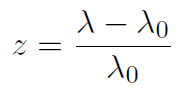
On the other hand, radio astronomers adopt different convention to define the velocity as,

Velocity Frame [fixed field]
A choice of the velocity frame is only LSR (Local Standard of Rest). The heliocentric frame is not implemented.
Coordinate System [mandatory field]
Choose the coordinate system from ‘Equatorial (J2000)’, ‘Equatorial (B1950)’, and ‘Galactic’.
- Right Ascension, Declination
If you chose Equatorial coordinates, you need to fill these forms in the unit of RA/Dec.
Format: hh mm ss.sss, ±dd mm ss.ss
You may omit ‘+’ sign and write minimum required numbers.
ex.) if the target coordinate is (RA, Dec) = (1h 23m 45.67s, +8°9′ 12.34”), the ‘nobs’ accepts both following expressions:
(01 23 45.670, +08 09 12.34) or (1 23 45.67, 8 9 12.34) - Galactic Longitude, Galactic Latitude
If you chose ‘Galactic’ at ‘Coordinate System’, the source coordinate should be written in the Galactic coordinate. For the 2017-2018 observing season, the ‘nobs’ can accept Galactic Longitude of 0~360 deg (the ‘nobs’ cannot accept <0 deg and >360 deg).
SiO Maser List
Pointing accuracy of the Nobeyama 45-m telescope should be checked every 1-1.5 hours. This can be done with an observation of H2O (22 GHz), SiO maser (43 and 86 GHz-bands), or continuum which are small enough to regard as a point source. The ‘nobs’ provides a list of available SiO(J = 1-0) maser sources at 43 GHz that can be used for pointing.
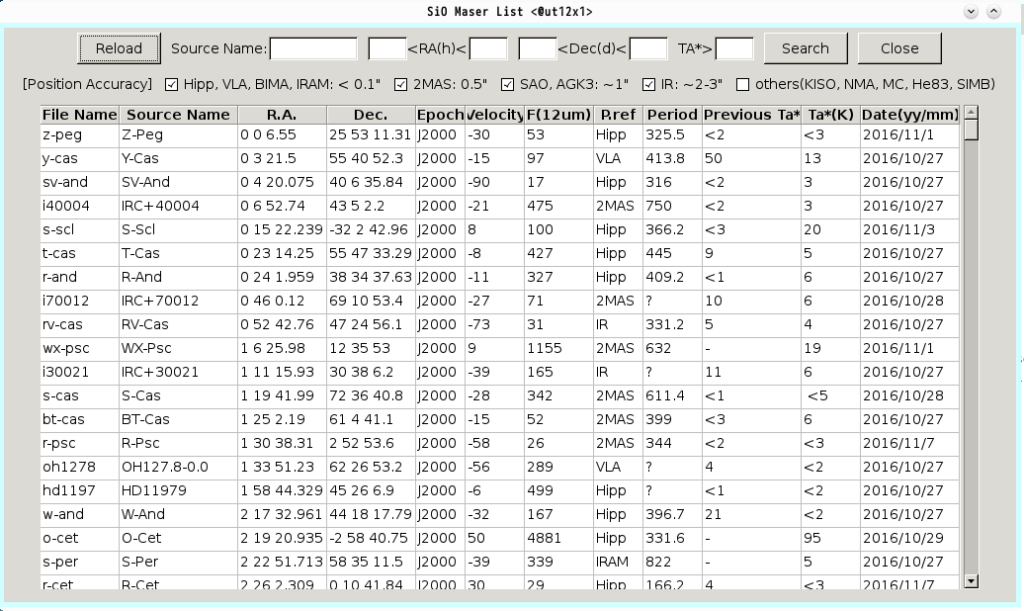
When you push the ‘SiO Maser List’ button, new GUI will pop-up. The GUI shows SiO maser list. You can then choose a SiO maser source by clicking a source given in the table. The information will be copied to the relevant area in the Source table (The input information is not saved yet. If you intend to use the target you selected, you need to push ‘Save’ button in the Source tab).
Reload
When you need to see the original SiO maser list after limiting the sources using ‘Search’ button as described below, please press ‘Reload’ button. The ‘nobs’ will reload the original SiO source list.
Search
You can limit the SiO masers with their name, ranges of their right ascension and declination, and/or recent antenna temperature. Pushing the “Search” button after inputting these values in the text boxes, and the list of the SiO masers are sorted according to these values. Although the observatory observes SiO masers within a year, an intensity of the SiO masers may vary from the values in this list.
ex. 1) Assume you want to search a pointing source which suits the following criteria
- 2 hr < Right Ascension < 8 hr
- 3 deg. < Declination < 20 deg.
- Ta* > 5 K.
In this case, fill the forms as below and press ‘Search’ button:
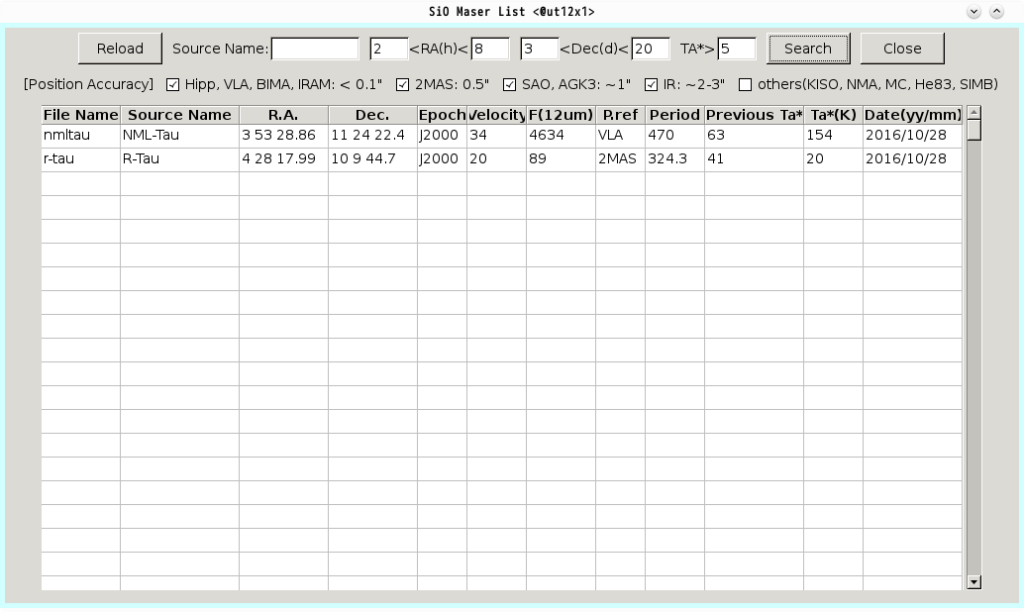
Then, you will find that NML-Tau and R-Tau fulfil the criteria.
The SiO maser search can accept a condition like ‘right ascension from 23 hr to 1 hr’.
ex. 2) If you need a pointing source close to right ascension of 23 hr, declination of 30 deg, and antenna temperature higher than 5 K, input the following values in the fields:
- 23 hr < Right Ascension < 1 hr
- 25 deg. < Declination < 35 deg.
- Ta* > 5 K.
The resultant is as follows:
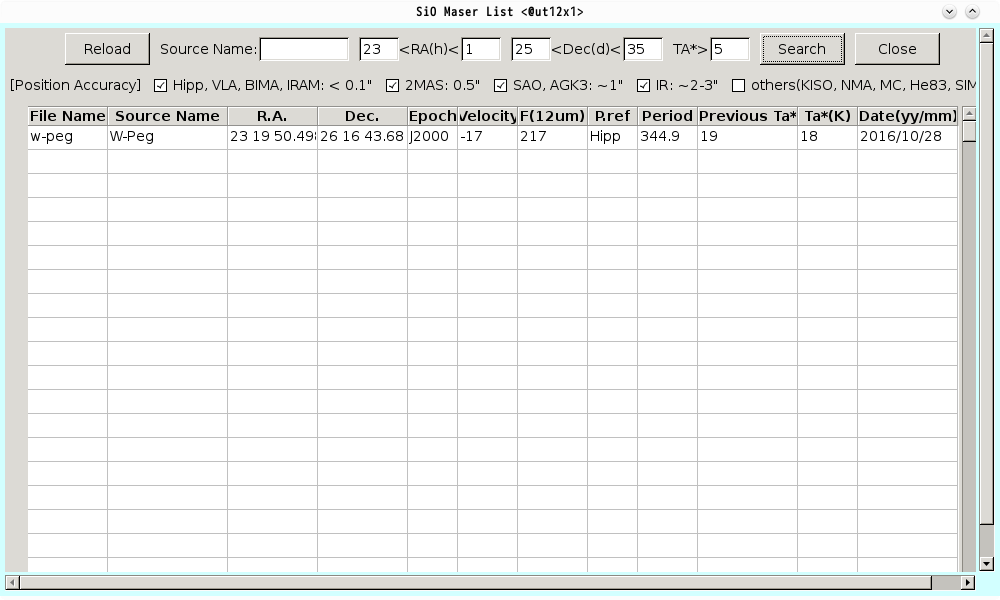
W-Peg is the SiO maser that suits your requirements.
Close
Pushing the ‘Close’ button makes SiO Maser List GUI invisible.