

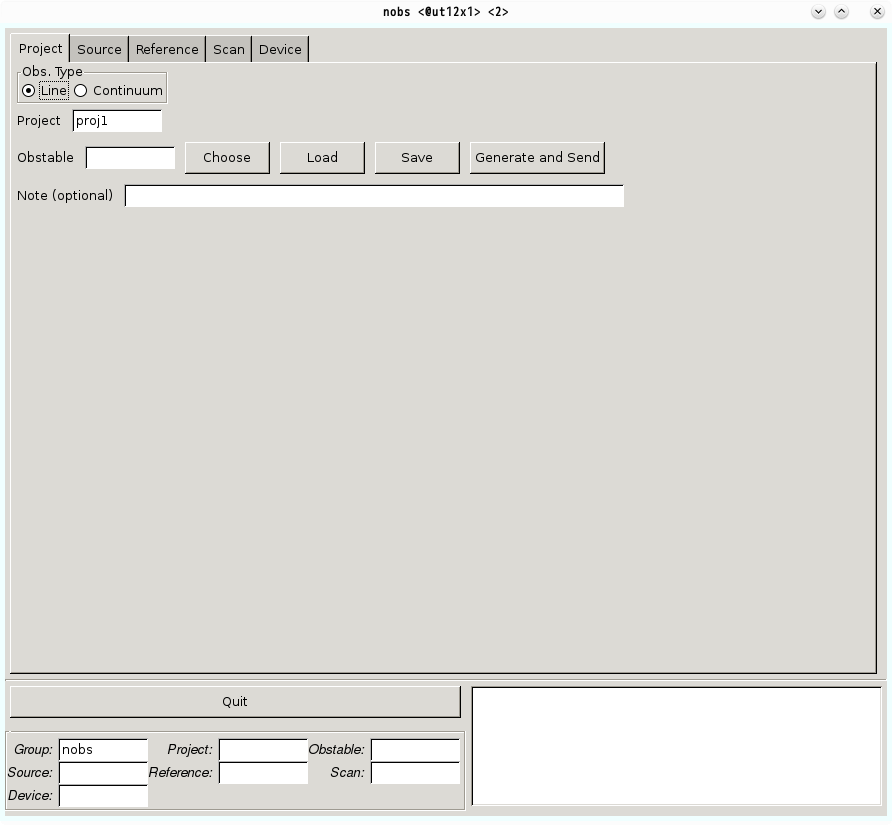
Project Tab is designed for generating observing scripts ‘Obstables’, which consist of a combination of source, reference, scan, and device tables.
Obs. Type [mandatory field]
Please choose the type of your observation. If you intend to observe emission line (or absorption line), choose ‘Line’. You are going to observe continuum sources, choose ‘Continuum’. For pointing observations with a continuum source, details can be described in the Pointing Observation with a Continuum Source.
Project [mandatory field]
As described in the introduction page, you need to fill this field the Project name you intend to use (i.e., proj1, proj2, and so on.). ‘proj1’ is already filled in the field by default.
Obstable [mandatory field]
After all other tables (source, reference, scan, and device tables) are made, please input a name of an Obstable, which defines the detailed observation procedures by specifying these four tables. This filename will be directly used for an operation of the Nobeyama 45-m telescope.
The ‘Choose’ button allows you to choose a pre-saved configuration file. The filename will appear in the relevant box. The ‘Load’ button will then load your configuration setup. The ‘Save’ button allows you to save your setup into a text-based configuration file. If any of four tables is not made, the nobs does not save the obstable. Once you save all of the files, your filenames should be displayed inside the Project Information Box located at the bottom-left corner of the GUI.
When you press the ‘Generate & Send’ button after configuring the four tables, the nobs automatically generates an observing script for the Nobeyama 45-m telescope using Source, Reference, Scan, and Device Tables you specified. If there is an error in generating a script, an error message will appear on information box in the bottom-right corner. Please follow the instruction and modify the field where the error occurred. It takes several seconds to check and generate the observing scripts. Please wait a while until the nobs returns any message on the information box.
Naming Rules for an Obstable
COSMOS, the control system of the Nobeyama 45-m telescope, puts some limitations on the filename of the obstable. Following items are the limitations of the filename for the obstable:
- The filename for the obstable has 7 character limit.
- The first letters of filenames should be one of the alphabetical letters.
- The subsequent letters should be composed of alphanumeric, plus sign, and minus sign.
- All character must be lower-case (No capital character is allowed).
Note (optional)
You can use this space to write any note for the Obstable. A character limit is 100, and a line break is prohibited.