

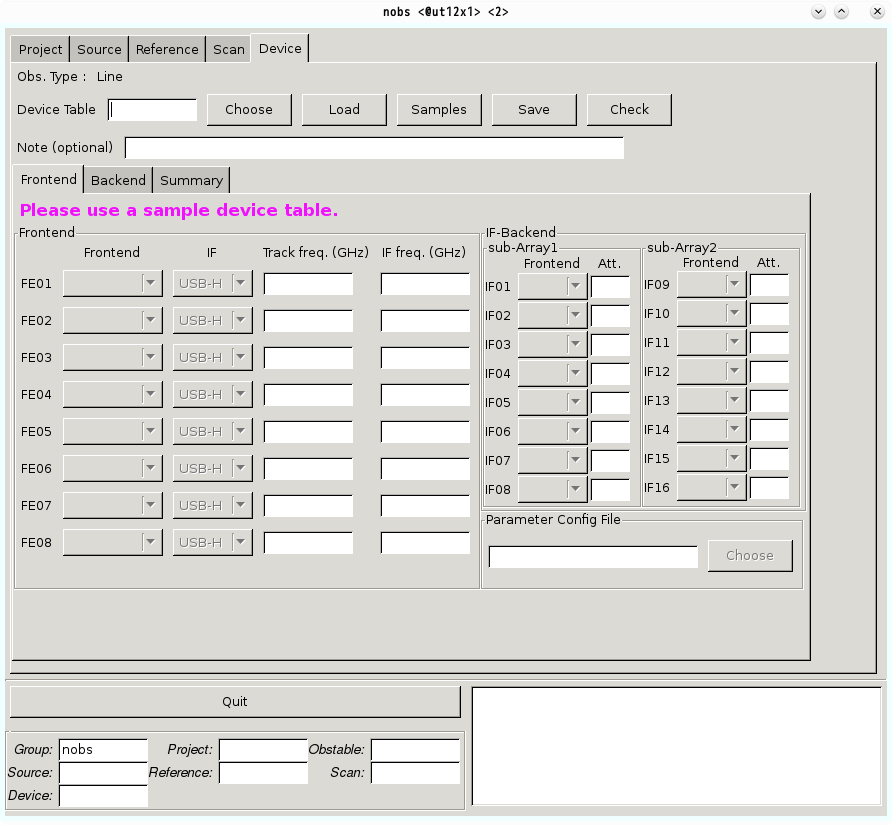
The device tab is designed to make the device table, in which frequency setup is written.
NOTE: We provide sample device files. Please select one of sample files from “Samples” button first. Then, modify “Track freq.(GHz)”, “IF freq.(GHz)”, and “Att.” in Frontend Tab, “Rest Freq. (GHz)” and “Resolution (kHz)” in Backend Tab according to your observing configurations.
- You cannot modify ‘Frontend’ and ‘IF’ (few exceptions exist) in Frontend Tab, and ‘FE’ in Backend Tab.
Device Table [mandatory field]
Enter a name of the device table. A configuration file will be saved under your working directory with the name of
<the name of the Device Table you defined>.ndevice
The limitations of a filename of the device table are as follows:
- The filename has 16 character limit.
- The filename does not contain any capital character.
- The first letter of the filename should be one of the alphabetical letters.
- The subsequent letters should be composed of alphanumeric, hyphen-minus sign, or underscore sign.
NOTE: You can save the input parameters anytime you want (the nobs allows you to save the scan table even if some mandatory fields still blank). The nobs does not check whether these input parameters follow the rules at that time.
Click the Check button for a basic check of the parameters. The nobs calculates and compares the relations of the Track Freq., IF freq., Rest Freq.. If an input value violates the setup rules, the nobs notifies the error in the information box at the bottom-right corner. The detailed frequency set-up is shown in the summary tab.
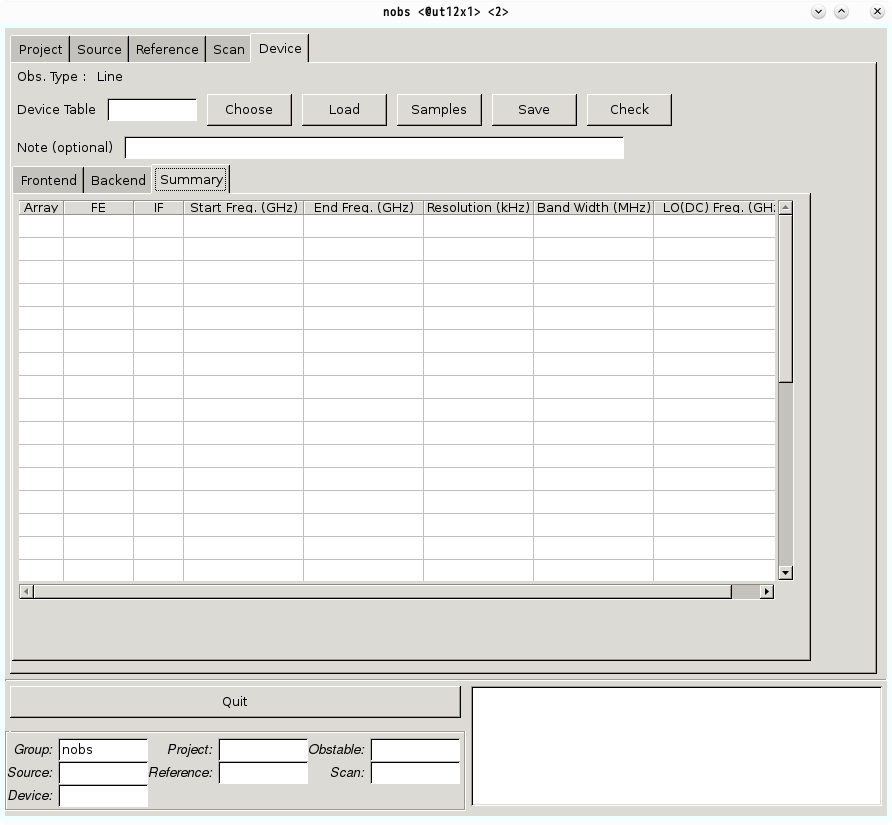
| Name | Explanation |
|---|---|
| Array | Array ID (A01~A32) |
| FE | Frontend: the receiver and the polarization |
| IF | selected IF |
| Start Freq. (GHz) | Rest Freq. – Bandwidth/2 |
| End Freq. (GHz) | Rest Freq. + Bandwidth/2 |
| Resolution (kHz) | Frequency resolution selected in each sub-array |
| Bandwidth (MHz) | Corresponding Bandwidth (relationship between the frequency resolution and the bandwidth is summarised in Resolution section) |
| LO(DC) Freq. (GHz) | Down-converted local oscillator frequency. Although in most cases there is no need to take care of LO(DC) frequency, user may consider LO(DC) frequency. In such a case, a derivation of LO(DC) frequency may help to make the device table. A calculation method is described in Appendix. |
Naming Rules of Sample Files
The observatory provides large numbers of sample files according to the following naming rules:
- Naming rules consist of four rules and each rule is expressed between the areas divided with the underscore signs
- The first block represents the receiver
‘f1’: FOREST with only Beam 1, ‘f2’: FOREST for the On-On scan mode,
‘fn’: FOREST with four beams, ‘fs’: FOREST with four beams and the spectral window mode,
‘h2’: H22, ‘h4’: H40, ‘t7’: T70, and ‘z4’: Z45 - The second block means the polarizations
‘v’: vertical, ‘h’: horizontal, ‘r’: right-handed circular, and ‘l’: left-handed circular - The third block expresses the sidebands
‘u’: USB-L, ‘l’: LSB-L, ‘p’: USB-H, and ‘m’: LSB-H - The fourth block is the number of arrays
‘4’: 4 arrays, ‘8’: 8 arrays, ‘a’: 16 arrays, and ‘s’: 32 arrays (using the spectral window mode)
Screenshots of each sample file and their concrete meanings are shown on the following page.
Device Table for Pointing Observation
When you make an observation script for pointing observations, the observatory recommends using the sample device file named ‘h4_u_4.ndevice’. This sample table uses H40 receiver and 4 arrays of SAM45, which is designed to observe SiO(1-0) maser. (If you do not have a specific reason, it is enough to use just 4 arrays of SAM45 for achieving the purpose of checking and correcting the pointing accuracy of the antenna.)
Note (optional)
You can use this space to leave any memo for the device table. A character limit is 100, and a line break is prohibited.
Frontend Tab
In the frontend tab, users choose a receiver and set its target frequency range.
Frontend
- Frontend [fixed field] (Nothing needs to be done here if the proper sample file is chosen)
Check the receiver (Frontend) with sideband information is correctly selected.
Names of available receivers are:
| Name | Receiver | Polarisation |
|---|---|---|
| H22R | H22 | Right-handed Circular |
| H22L | Left-handed Circular | |
| H40 | H40 | Left-handed Circular |
| Z45H | Z45 | Horizontal |
| Z45V | Vertical | |
| T70H | T70 | Horizontal |
| T70V | Vertical | |
| FORESTH | FOREST | Horizontal |
| FORESTV | Vertical |
- IF [(mostly) fixed field]
Check an appropriate combination of IF and sideband is chosen.
In most cases, users can choose any IF listed above (a combination itself cannot be changed by yourself). However, for FOREST, users cannot use USB-L and LSB-H simultaneously due to mechanical connections.
| Name | Sideband | Available Receiver | IF Range (GHz) |
|---|---|---|---|
| USB-L | Upper Sideband | H22, H40, Z45, T70, and FOREST | 5-7 (for H22 and H40) 4-8 (for Z45, T70, and FOREST) |
| USB-H | Upper Sideband | FOREST | 7-11 |
| LSB-L | Lower Sideband | T70 and FOREST | 4-8 |
| LSB-H | Lower Sideband | FOREST | 7-11 |
- Tracking Freq. [mandatory field]
Specify tracking frequency in GHz.
For single-line observations, this is the frequency of the line you are interested in. For multi-line observations using a single receiver, this should be near the average of all of the rest frequencies of the lines you are interested in.
| Frontend | Tuning Range (GHz) | LO Frequency Range (GHz) |
|---|---|---|
| H22 | USB: 20 -25 | 14 – 19 |
| H40 | USB: 42.5 – 44.5 | 36.5 – 38.5 |
| Z45 | USB: 42 – 46 | 36 – 40 |
| T70 | LSB: 67 – 92, USB: 79 – 108 | 75 – 100 |
| FOREST | LSB: 80 – 108, USB: 90 – 116 | 86 – 112 |
- IF freq. [mandatory field]
This user-specified intermediate frequency (in GHz) is the frequency that the “Tracking Frequency” is down-converted into. In other words, FIF = Ftrack +/- FLO, where FIF is the Intermediate Frequency, Ftrack is the Tracking Frequency, FLO is the Local Oscillator Frequency, and the +/- sign is determined from the sideband you chose: + for USB and – for LSB. In case that more than one IF is chosen, please all local oscillator frequency fLO have the same value. Unless there is no special reason, most observations can be done with the values provided below. These values correspond to the centre of IF of each receiver.
| Frontend | FIF (GHz) |
|---|---|
| H22, H40, Z45, T70, and FOREST(USB-L and LSB-L) | 6 |
| FOREST(USB-H and LSB-H) | 9 |
IF-Backend
- Att [mandatory field]
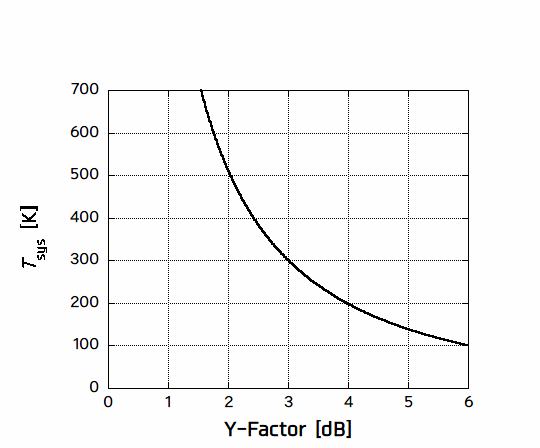
This sets the value of the attenuator when the hot-load is inserted. This is typically set to the Y-factor values. The relationship between Tsys and Y-factor for R-Sky calibration system is roughly estimated as follows:
Tsys = 300 /(10Y/10-1) [K]
These values should be re-adjusted if Tsys are varied (i.e., depends on weather condition). If you are not sure, please use the following table as a guideline.
| Frontend | Frequency (GHz) | Att (dB) |
|---|---|---|
| H22 | 23 | 5 |
| H40 | 43 | 5 |
| Z45 | 44 | 5 |
| T70 | — | 5 |
| FOREST | — | 4 |
The role of the “Att”enuator:
A value specified at the attenuator (Att) is added to the initial value of the attenuator in the IF system, only when the receiver sees a hot-load during the absolute intensity calibration. This additional attenuation reduces the power of a signal to stay in the good linearity range of the system. An inappropriate value specified at the attenuator may cause incorrect values of Tsys and intensities of spectral lines.
Parameter Config File [Not in Use]
Backend Tab
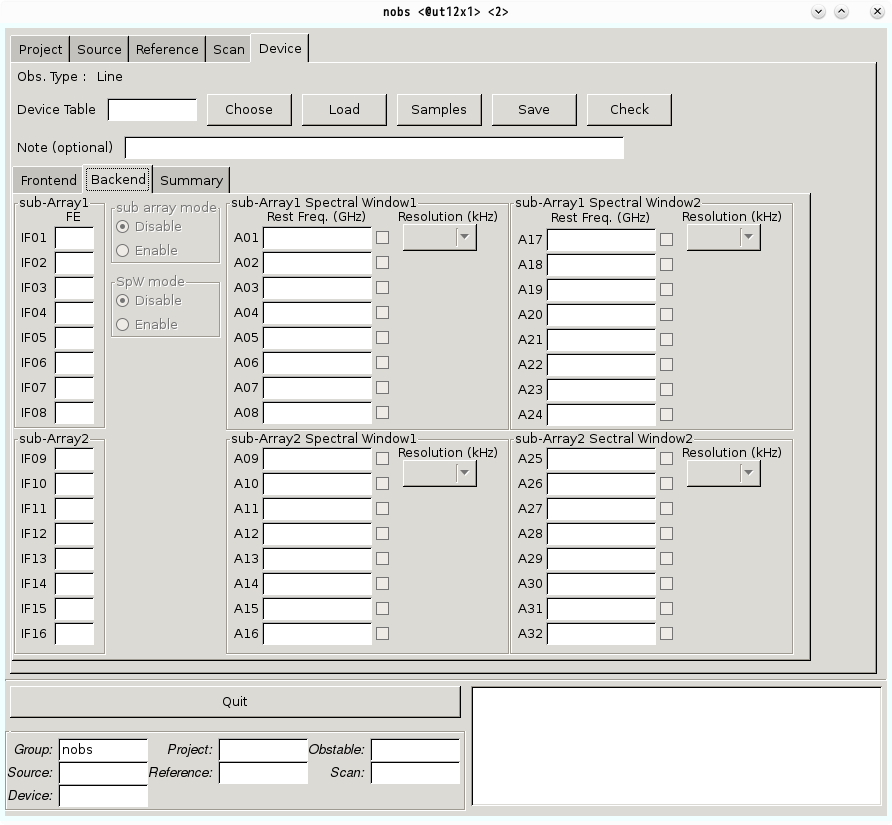
With the backend tab, users can arrange the frequency setup for a spectrometer. There is only one spectrometer, SAM45, is mounted on the Nobeyama 45-m telescope. The SAM45 spectrometer is a highly flexible FX-type correlator (spectrometer) that allows a maximum of 32 GHz of bandwidth (2GHz, ~1.6GHz effective, x 16 arrays) in 4096 spectral channels. The arrays are donated A1, A2, …, A32 in the device table. SAM45 consists of 32 arrays, where the resolution of the arrays can be set at 3.81, 7.63, 15.26, 30.52, 61.04, 122.07, 244.14, 488.28 kHz. The prior 16 arrays are called Sub-array 1, while the posterior 16 arrays are Sub-array 2. The sub-array 2 cannot be used unless the Spectral Window (SpW) mode is selected. If users set the ‘sub-array’ mode on, two independent frequency-resolution settings can be applied for the sub-array 1 and the sub-array 2.
The bandwidth for each resolution settings can be calculated by multiplying the number of channels (4096) for each array (see table). All reciever (FOREST, T70, Z45, H40, and H22) can be connected to SAM45.
sub-Array1, sub-Array2 [fixed field]
This field allows users to know the connection of the signal from the receiver to an array in SAM45. IF(n) is connected to SAM45 array A(n) and A(n+16) (n:1~16). For example, if FE of ‘IF01’ is filled with ‘FE01’, you are connecting the receiver you chose for FE01 at Frontend Tab and the signal will be sent to SAM45 A01 and A17.
sub array mode
Sub-array mode allows you to set a maximum of two independent frequency-resolution (bandwidth) modes. Simply enable/disable the sub-array by clicking on the radio button. When enabled, you can choose the second set of the frequency resolution. The sub-array mode is available with FOREST, T70, H40, and H22 receivers using at least 16 arrays.
SpW mode
The spectral window (SpW) mode is only available for FOREST receiver and users should use dedicated sample files (a filename with fs_~_s.ndevice). When SpW mode is enebled, users can set two different spectral-resolutions with the same IF and sideband (i.e., USB-H, USB-L, LSB-H, and LSB-L). Note that the specified IF range and the LO frequency cannot be changed. Also see the status report about Spectral Window mode.
Sub-Array1 Spectral Window1, Sub-Array2 Spectral Window1, Sub-Array1 Spectral Window2, and Sub-Array2 Spectral Window2
- Rest Freq.(GHz)
Enter the rest frequency (in GHz) of a target line for each spectrometer you use. In case that users intend to perform a simultaneous observation of multiple lines, whose rest frequency locates within same bandwidth, the averaged rest frequency is to be filled in the field. If targets are high-z objects, please fill this field with red-shifted frequency. When one of SAM45 arrays is out of order, users easily exclude such array by clicking the check box in the right (current SAM45-array status can be referred here). - Resolution (kHz)
Choose the spectral resolution for each sub-array. See also the first item on this FAQ page if you are preparing for OTF observations. Note that bandwidth for the SpW mode becomes as half as that for the non-SpW mode.
| Spectral Resolution (kHz) | Bandwidth for non-SpW mode (MHz) | Bandwidth for SpW mode (MHz) |
|---|---|---|
| 3.81 | 16 | 8 |
| 7.63 | 31 | 16.5 |
| 15.26 | 63 | 31 |
| 30.52 | 125 | 63 |
| 61.04 | 250 | 125 |
| 122.07 | 500 | 250 |
| 244.14 | 1000 | 500 |
| 488.24 | 2000 (~1600 effective) | 1000 (~800 effective) |